Admin Console
The |Admin Console| serves as a central hub for managing your OA Mobile
account.
It displays key account information, including your Login Name, Display Name, Company Name, active user
count, account contact information, and billing details.
To access the |Admin Console|, follow the directions below.
- From the |Navigation Bar|, select |My Account|.
- From the |My Account| section, select |Admin Console|.
- Scroll down to view additional account information.
- Use the |Admin Console| to manage your OA Mobile account settings and billing information.
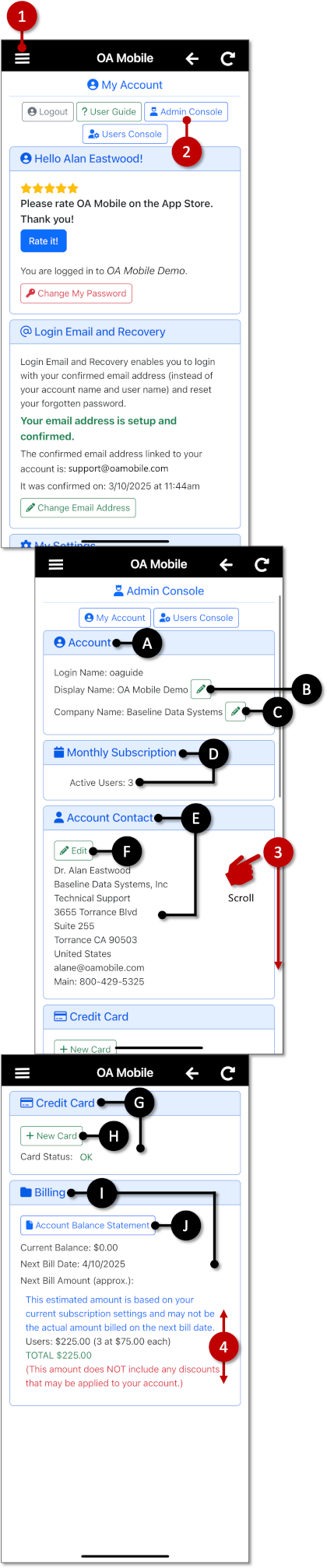
- A: The |Account| section displays your Login Name, Display Name, and Company Name.
- B: Use this button to update your Display Name.
- C: Use this button to update your Company Name.
- D: The |Monthly Subscription| section displays the number of active users in your account.
- E: The |Account Contact| section displays your registered contact information.
- F: Use the |Edit| button to update your contact information.
- G: The |Credit Card| section displays the status of your current payment method.
- H: Use the |New Card| button to add or replace the payment method used for your OA Mobile subscription.
- I: The |Billing| section provides details about your account balance, next billing date, and amount due.
- J: To review or download your billing statements, select the |Account Balance Statement| button in the |Billing| section.
The |Admin Console| serves as a central hub for managing your OA Mobile
account.
It displays key account information, including your Login Name, Display Name, Company Name, active user
count, account contact information, and billing details.
To access the |Admin Console|, follow the directions below.
- From the |Navigation Bar|, select |My Account|.
- From the |My Account| section, select |Admin Console|.
- Scroll down to view additional account information.
- Use the |Admin Console| to manage your OA Mobile account settings and billing information.
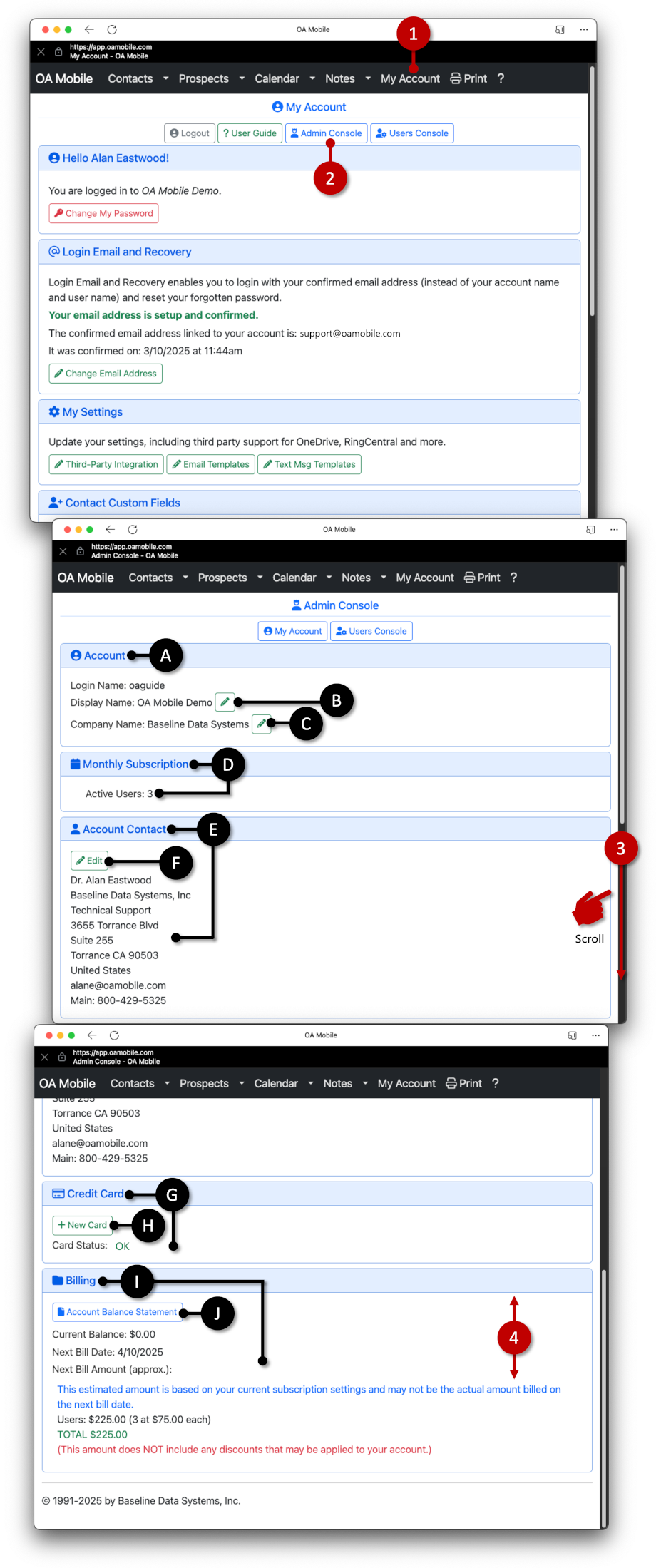
- A: The |Account| section displays your Login Name, Display Name, and Company Name.
- B: Use this button to update your Display Name.
- C: Use this button to update your Company Name.
- D: The |Monthly Subscription| section displays the number of active users in your account.
- E: The |Account Contact| section displays your registered contact information.
- F: Use the |Edit| button to update your contact information.
- G: The |Credit Card| section displays the status of your current payment method.
- H: Use the |New Card| button to add or replace the payment method used for your OA Mobile subscription.
- I: The |Billing| section provides details about your account balance, next billing date, and amount due.
- J: To review or download your billing statements, select the |Account Balance Statement| button in the |Billing| section.
© 1991-2026 - Baseline Data Systems, Inc.